
zencontrol uses a test manager to control emergency testing.
The test manager is designed to manage
- Testing of the emergency device
- Repair of the emergency device
- Retesting of the emergency device
- The complaint recording of the tests, changes and fixes of the emergency lighting
To ensure that these tasks are all linked together, the test manager uses a test window, which defines all the actions within this time are allocated against the test.
Typically the test window will run between the start of the test and the start of the next test.
The user has until EXECUTION_TIMEOUT + 1 DAY before the end of the test window period to have the device run its test inside the first window.
All results from the tests need to be reported back to the cloud prior to the end of the test window.
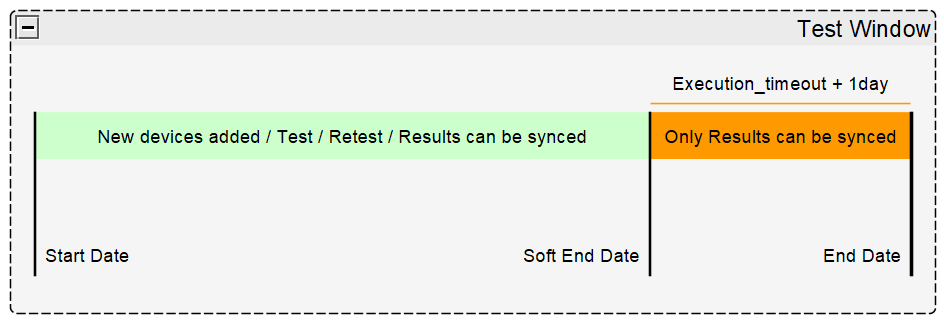
Example:
If the next Duration test is scheduled to start on the 05/09/2018 and the sites execution timeout is 7 days, they have until the 28/08/2018 to commission all the devices to be inside the current ACTIVE test. You can see the current ACTIVE test on the web portal Emergency report page, under the Active tab.
A user can add a device at any point in time and it will be added to the current ACTIVE test window. Devices that are repaired (replaced, battery replaced etc), run their re-tests inside the current ACTIVE test window. After fixing all the faults, the contractor can download the report and see that the device failed a test and was replaced.
Example Operation:
- User sets up a 6 monthly duration test schedule
- User commissions all the devices over a 1 month period
- User repairs all the faults (if no faults, they skip to step 5)
- User waits for re-tests
- User downloads the report with all the devices passing (includes history of initial failed tests)
Comments
0 comments
Article is closed for comments.